You can build a WhatsApp chatbot by choosing the right WhatsApp business setup, defining the conversations it should handle, connecting a chatbot platform or the official WhatsApp Business Platform API, and testing its responses before launch
You can build a WhatsApp chatbot by choosing the right WhatsApp business setup, defining the conversations it should handle, connecting a chatbot platform or the official WhatsApp Business Platform API, and testing its responses before launch. A simple chatbot can answer common questions and collect customer details, while an advanced system can qualify leads, connect with a CRM, and transfer complex enquiries to a human agent.
The best approach depends on the number of conversations, the level of automation required, and the tools already used by the business. A reliable chatbot starts with a clear purpose, accurate information, sensible conversation flows, and a straightforward way for customers to reach a person when needed.
Step 1 Define the Chatbot’s Purpose
Start by identifying the main problem the chatbot should solve. Common goals include answering frequently asked questions, capturing enquiries, booking appointments, sharing service information, and qualifying potential customers.
Choose two or three tasks for the first version rather than automating every customer interaction immediately.
For example, a property agency might ask customers which location they prefer, their property type, and their viewing availability. An educational coach might collect a learner’s preferred course and suitable consultation time.
Step 2 Choose the Right WhatsApp Setup
WhatsApp offers different options depending on how much automation a business needs.
WhatsApp Business App
The WhatsApp Business app suits small businesses that need basic customer communication. It provides features such as a business profile, greeting messages, away messages, and quick replies. It is a practical starting point when advanced automation is not necessary.
WhatsApp Business Platform
The WhatsApp Business Platform supports programmatic messaging, automation, and connections with business systems. It is more suitable when a business needs custom chatbot logic, CRM integration, or a larger-scale messaging workflow.
No-Code Chatbot Builder
A no-code chatbot builder allows users to create conversation flows through a visual interface. Depending on the provider, it may offer menus, automated responses, lead collection, and integrations without requiring extensive programming.
The official WhatsApp Business FAQ explains the differences between the Business app and the Business Platform. Choose the option that matches the required level of automation and control.
Step 3 Set Up WhatsApp Business Platform Access
If the chatbot requires automation beyond basic app features, set up access to the official WhatsApp Business Platform.
The general process involves:
Create or access a Meta business portfolio.
Set up a WhatsApp Business Account.
Register an eligible business phone number.
Create the required developer application if building a custom integration.
Configure the WhatsApp Cloud API and obtain the necessary permissions and access tokens.
Connect a chatbot builder or your own backend system.
A no-code provider may handle much of the technical setup. A custom implementation generally requires development knowledge and familiarity with API requests and webhooks.
Follow the official WhatsApp Cloud API documentation for current setup instructions.
Step 4 Design the Conversation Flow
Plan how the chatbot should respond before connecting it to customers. Keep messages short, use clear options, and ask only for information needed to complete the task.
A basic conversation should include:
Welcome message: Greet the customer and explain what the chatbot can help with.
Main menu: Offer options such as service information, appointments, or speaking to a person.
Information collection: Ask relevant questions one at a time.
Confirmation: Summarise the details and confirm the next action.
Human handover: Provide a clear route to a team member when the chatbot cannot help.
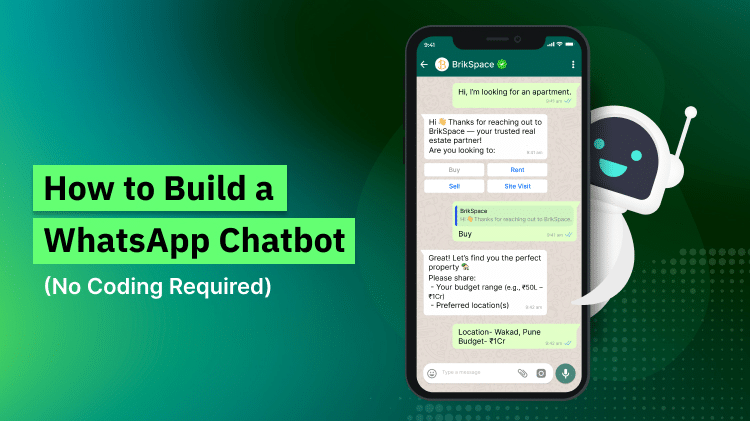
For example, a chatbot qualifying a property enquiry could ask about the preferred location, property type, and expected viewing time before passing the details to an agent.
Step 5 Connect the Chatbot to Business Systems
A chatbot becomes more useful when it can pass information to the systems employees already use. A CRM connection can save contact details, record enquiry sources, assign leads, and create follow-up tasks.
For custom integrations, webhooks notify a connected server when events occur, such as incoming messages or message delivery updates. The server can process the event and send an appropriate response. See the WhatsApp Business Platform webhook reference.
Several technical components may be involved:
Cloud API: Sends and receives WhatsApp messages through an approved business connection.
Webhook: Delivers event notifications to a configured endpoint.
Backend or chatbot builder: Processes messages and determines the next response.
CRM integration: Stores lead information and supports follow-up workflows.
Access token: Authorises permitted API requests.
Human handover: Transfers an enquiry to an available team member.
Protect access tokens and customer records. Use secure connections, limit permissions, and avoid placing sensitive credentials in public code or browser-facing applications.
Step 6 Test Before Launching
Test the chatbot with realistic conversations before making it available to customers. Include expected messages as well as unusual situations.
Check whether the chatbot can:
Answer common questions accurately.
Handle spelling mistakes and unclear requests.
Collect information without losing earlier answers.
Prevent duplicate records where possible.
Confirm appointments or enquiries correctly.
Transfer conversations to a human agent.
Recover from API failures or delayed responses.
Step 7 Follow WhatsApp Messaging Rules
Businesses must follow the applicable WhatsApp Business policies. Customers should understand what they are agreeing to, and businesses should respect opt-outs and relevant privacy requirements.
According to the WhatsApp Business Messaging Policy, businesses can send free-form replies within the 24-hour customer service window after a user message. Outside that window, business-initiated messages generally require approved message templates. The policy also requires clear escalation paths when automation is used.
Keep chatbot responses accurate, avoid unsolicited messaging, and make human assistance easy to access. Review the current policy before launching because messaging requirements can change.
Things to Consider Before Making a Decision
Ease of Management
Check whether non-technical employees can update answers, menus, and business information without developer assistance. A system that is difficult to maintain can quickly become outdated.
Integration Requirements
Confirm that the chatbot connects with the existing CRM, website, calendar, or other essential tools. Check which information syncs automatically and whether the integration needs ongoing technical support.
Data Protection
Review how the platform stores and processes customer information. Ensure the business can manage access permissions, retention, and deletion in line with applicable data protection requirements.
Language Support
Consider the languages customers use most often. If customers communicate in English and Urdu, test whether the chatbot can understand both languages and respond clearly without confusing similar words or switching languages unexpectedly.
Reporting and Future Growth
Choose a setup that helps the team identify unanswered questions, failed messages, completed enquiries, and successful human handovers. The system should also support additional conversation flows as business requirements change.
WhatsApp Automation Services for Different Business Needs
LastingSales provides services relevant to lead management and customer communication workflows.
Leadly AI Agent: Supports AI-assisted customer responses and lead qualification according to the configured capabilities.
Mobile CRM: Helps teams organise contacts, track leads, and manage follow-up activities.
Property and Real Estate: Relates to organising property enquiries and capturing relevant applicant information.
Confirm the available WhatsApp integrations and specific features before choosing a solution.
Common Questions Before Building a WhatsApp Chatbot
Do I need coding skills to create a chatbot?
No. No-code builders can create basic conversation flows. Custom API integrations usually require technical knowledge or assistance from a developer.
Can a chatbot send messages automatically?
Yes, within the applicable platform rules. Business-initiated messages outside the customer service window generally require approved templates.
Can a WhatsApp chatbot collect and qualify leads?
Yes. It can ask relevant questions, collect contact details, and pass responses to a CRM when the integration supports those functions.
How to Maintain a WhatsApp Chatbot Over Time
How often should chatbot answers be updated?
Review answers whenever services, operating hours, policies, or business processes change. Schedule regular checks to identify outdated information.
What should happen when the chatbot gives an incorrect answer?
Provide a clear correction route, review the conversation, and update the flow or information source responsible for the mistake.
How can chatbot performance be measured?
Monitor completed enquiries, unanswered questions, successful handovers, response failures, and customer feedback. Use the results to improve the conversation flow.
Can a chatbot support customers outside business hours?
Yes. Automated responses can acknowledge enquiries and collect basic details at any time, subject to the setup and platform availability. Complex requests may still require a team member during working hours.
How should customer information be protected?
Collect only necessary details, restrict access, secure integrations, and follow applicable data protection requirements. Review how the chatbot provider stores and processes customer information.
Build a Chatbot Around Real Customer Needs
A successful WhatsApp chatbot combines a clear purpose, a simple conversation flow, reliable integration, thorough testing, and a clear path to human support. Start with a few useful tasks, review actual customer interactions, and improve the chatbot using measurable results.
For information about lead qualification and CRM workflows, contact LastingSales at info@lastingsales.com or +44 7507 30 5610. Evaluate the available options against your business requirements before choosing an implementation approach.